

 WINDOWS APPLICATION V0.0.6
With your Digilab subscription, automate the download of your orders directly to your computer.
Sync Digilab in real time
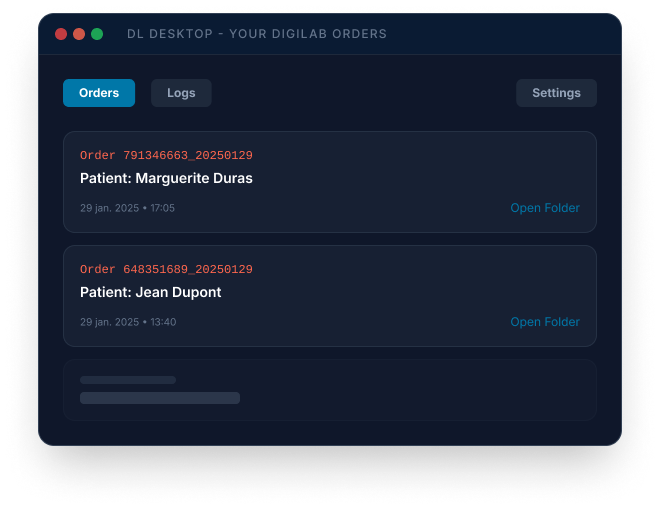
Everything DL Desktop does for you
Automate the download and organization of your Digilab orders

Automatic download
Retrieves your orders every 2 minutes in the background, without any manual intervention.
Native Exocad export
Automatic generation of .dentalProject files ready to open in Exocad DentalCAD.
Instant notifications
Taskbar alert for every new order with essential details.
Automatic organization
Files sorted into structured folders according to your local preferences.

DL Desktop Documentation
How does DL Desktop work?
1. Retrieval
DL Desktop connects to your Digilab account and automatically downloads all your orders and associated files.
2. Conversion
The software automatically generates Exocad exports (.dentalProject).
3. Organization
Files are sorted into your defined folders, ready to be opened directly in Exocad.
Permissions and roles: Based on your role in Digilab, DL Desktop downloads the corresponding orders.
Full access to all lab orders. DL Desktop will automatically download all your orders.
DL Desktop will only download orders that have been assigned to you by your administrator.
Minimum system requirements

Windows 10 or Windows 11

Intel Core i3 or equivalent

4 GB minimum (8 GB recommended)

Minimum 500 MB for the application
Stable connection (5 Mbps minimum)
Authorization for target directories
Installation in 5 steps
Download the installer
Click the download button to get DL Desktop (0.0.6).
Run the installation
Open the downloaded file and follow the on-screen instructions.
Set up your credentials
In the Settings tab, enter your Digilab credentials.
Enable retrieval
Check the activation option.
Set your folders
Configure the destination folders for orders, Exocad exports, and 3Shape.
COMPATIBLE WITH WINDOWS 10 / 11 • FREE • VERSION 0.0.6
Configuration settings
In the Settings tab of DL Desktop, configure the following options:
Digilab username
Your Digilab login email
Password
Your secure password
Activate automatic retrieval
Enables automatic downloading in the background
Retrieve orders only after validation
Only downloads orders validated on Digilab
Request orders since
Time interval for retrieval (e.g., 24 hours)
Download folder
Main storage folder for orders
Logs folder
Folder for daily logs
Exocad folder
Folder for .dentalProject exports
Tip
After saving your settings with the Save button, wait a few seconds for the retrieval process to start. You can track operations in real time in the Logs tab.
Daily usage
DL Desktop runs in the background and automatically retrieves orders every 2 minutes. You receive a taskbar notification for every new order.

Orders tab
Browse and search all locally downloaded orders. For each order, you can open the local folder or view the order online on Digilab.

Logs tab
History of downloads and any errors since the application started. Complete logs are stored in the folder defined in settings.

Exocad export
Format: .dentalProject
- STL, PLY, and images bundled
- Automatic project generation
- Direct DentalCAD opening

Smart management
Organization, Security, and Flexibility
- Automated file organization
- Secure local backup
- Multi-workstation deployment
Ready to automate your downloads?
Download DL Desktop for free and receive your Digilab orders directly on your computer.
Free • Windows 10/11 • v0.0.6